

Salad logoSalad logo
Quickstart
How to Find Your GPU or CPU SpecificationsHow to Enable Compute Mode on AMD DriversHow to Update your Nvidia DriversHow to Update your AMD DriversHow to Reinstall your GPU Drivers.How to Create a HAR FileHow to Create a Support TicketHow to Check if your Salad Installer is SafeHow to enable Virtualization Support on your machineEnable Virtualization on HP PCsIdentifying Your CPUEnable Virtualization on Lenovo PCsEnable Virtualization on Acer PCsEnable Virtualization on Asus PCsEnable Virtualization on Dell PCsEnable Virtualization by Motherboard: MSI (American Megatrends)Identifying your MotherboardEnable Virtualization by Motherboard: GigabyteHow to Update the WSL Kernel on your PCHow to Save Network Requests (HAR File)How to Improve Internet Speed for Container JobsHow to Disable ECCHow to Update your Intel Drivers
Discord
GuidesYour PC

Enable Virtualization on Acer PCs

Many commercially available PCs allow users to manage their BIOS configuration directly from the startup screen. These step-by-step guides will help you access and adjust the BIOS settings on prebuilt PCs manufactured by Acer.

If you don't know what kind of CPU you have, please see Identifying Your CPU.

With Intel Processors

  1. Restart or boot your computer.

  2. Immediately press F2 to enter the BIOS Setup Utility.
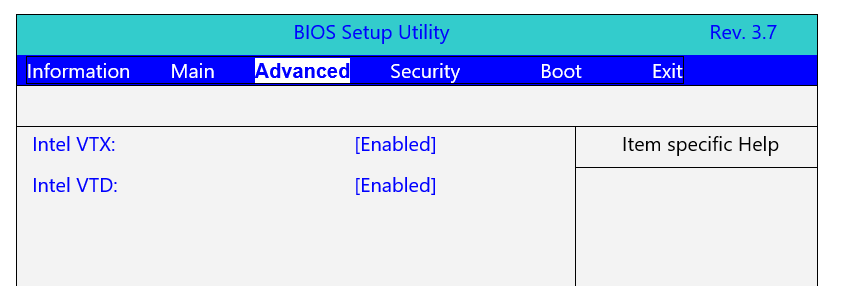
    Screenshot of BIOS

  3. Using the arrow keys, navigate to the Advanced tab.

  4. Using the arrow keys, enable both Intel VTX and Intel VTXD. (Some models require you to press Ctrl + S to make these settings visible.)

  5. Press F10 once more to save your configuration and exit.

With AMD Processors

  1. Restart or boot your computer.

  2. Immediately press F2 to enter the BIOS Setup Utility.
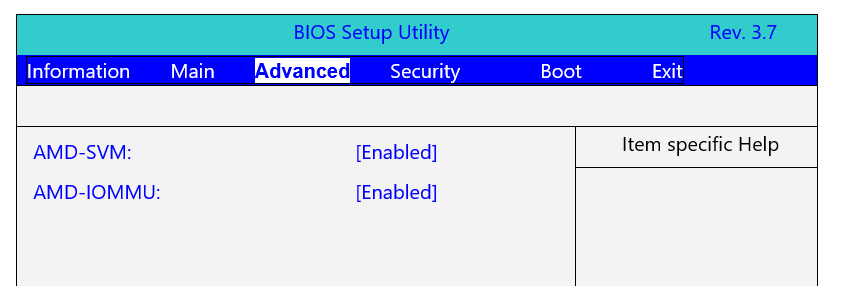
    Screenshot of BIOS

  3. Using the arrow keys, navigate to the Advanced tab.

  4. Using the arrow keys, enable both AMD-SVM and AMD-IOMMU. (Some models require you to press Ctrl + S to make these settings visible.)

  5. Press F10 once more to save your configuration and exit.

Edit on GitHub

Last updated on

Enable Virtualization on Lenovo PCs

Previous Page

Enable Virtualization on Asus PCs

Next Page