

Salad logoSalad logo
Quickstart
Using the Salad appSalad app settingsSalad's running statesWhat is the activity indicator?Chopping PowerHow to enable auto startHow to enable or disable auto launchHow to disable sleep modeSchedule choppingHow to enable and disable hardwareElevated permissionsSalad app passkeysHow to edit your profileHow to log out of the Salad web appEarnings summaryLinux onboardingHow to find your Salad machine IDHow to view your Salad achievementsHow to claim a bonusHow does the notifications page work?How to find your Salad log filesHow to update SaladHow to uninstall Salad
Discord
GuidesUsing the Salad App

How to update Salad

How Salad app updates are delivered and how to install one.

When a new version of the Salad app is available, Salad tells you with a desktop notification, as well as in-app notification. Click Update Now to install it; the app restarts on the new version. Learn More opens the What's New page with the change log.

Job Progression

Updating the app can take a few minutes, and closes the app and all underlying processes. This means updating the Salad App will stop any active workloads, and Salad will need to find a new workload after the update is complete.
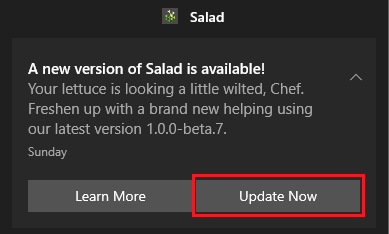
update now button on windows notification

Updates are only offered for the update channel you have selected. If an update keeps failing, download the latest installer from the official sources and run it over your existing installation.

Edit on GitHub

Last updated on

How to find your Salad log files

Where the Salad log files are, which folder to zip, and how to send them to Salad Support.

How to uninstall Salad

Remove the Salad app from a Windows PC through Windows Settings.